Designing an Agent in Slack
Two years of building Windy in Slack: what makes a good Slack agent UX, the details that make it hard, and how Windy, Linear, Mintlify, and Vercel compare.

For a decade, software design meant web and mobile apps. Nav bars, tabs, layouts, typography and animations were what made good design. Companies like Linear, Vercel, Notion and Stripe delivered incredible UX that fueled hypergrowth and rabid fan bases.
Today, this type of UX still matters but a new one is becoming important - Agent UX. It’s far more constrained — a text box and chat bubbles back and forth. These experiences are standardizing around the UI you see in ChatGPT and Claude.
But agents can live anywhere, and one of the most common places is Slack. Here at Windmill we have our agent Windy and over 90% of the usage happens in Slack. Slack is incredible because it’s where your team already works. It’s a natural place for agents.
But Slack presents some unique challenges. You do NOT have full control over the UX. APIs are limited and were primarily built for old school “bots,” not full agent experiences. We launched our agent Windy in Slack almost 2 years ago (November 14, 2024).
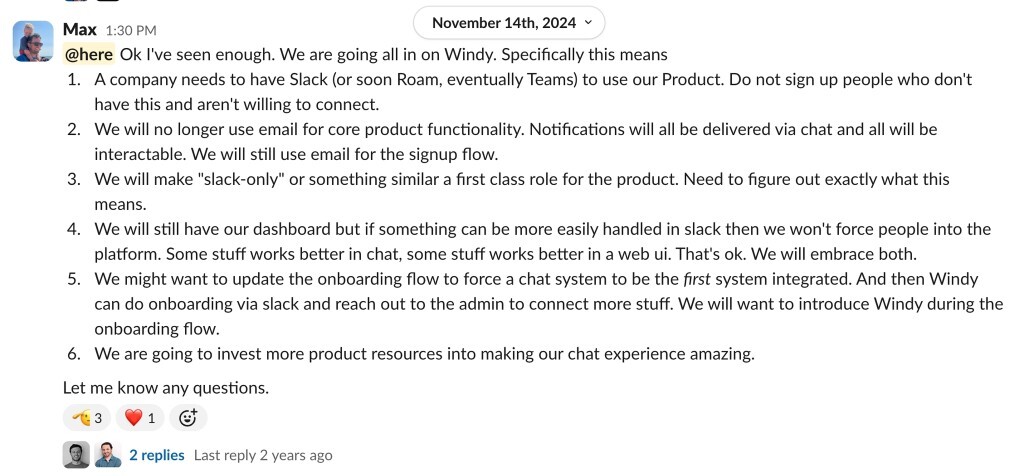
Over that time we’ve learned a ton, both about what makes a good Slack UX and about the details that make designing in Slack hard.
Here are the challenges we’ve hit and what best in class looks like.
Thinking
Agents are slow. The best case is a few seconds before you get a response. Often it’s minutes. How do you show what’s happening?
Slack has a few options:
- Emoji - Agent adds an emoji to the message
- Thinking - Native streaming with
chat.startStream - Status - Native status with
assistant.threads.setStatus - Plan Blocks - Block Kit’s
planblock - Quick Response - A normal message when work starts and another when it finishes.
If you compare Windmill, Linear, Mintlify and Vercel, status is the most popular. Only Mintlify opts to use plan blocks. Personally, I like the plan blocks for long running tasks but it’s too much every time.
Emojis
For anyone who is a heavy Slack user you know how important emojis are. There are some common shared conventions across most companies:
- 👀 means “I’m looking at this”
- ✅ means “done”
- 🎉 means “we shipped”
But every company has a unique culture that often comes with custom emojis.
If you want your agent to feel like a teammate you need it to understand and reply with emojis. On the AI side this is difficult to get right and LLMs love being super cringy so you gotta be careful.
Windy, Linear and Mintlify can all react with emojis. Vercel can’t.
I have yet to find an agent that really does a good job at this.
Slack Blocks
A really nice feature to layer on is letting your agent send Slack blocks. It’s the same idea as the Ask User Question tool in Claude: the agent asks a multiple choice question and you answer with one tap. Frontier models are pretty good at generating these, and multiple choice cuts the cognitive load.
Mintlify is the only one that pulls it off, with real radio buttons and a Submit. Linear falls back to a plain numbered list. Vercel refuses the question entirely, and even on a Vercel-flavored one it only manages plain text.
Consecutive Messages
As you start using agents a lot you’ll notice one detail when you’re working quickly: what happens when you send a second message before the agent has responded to the first? There are 4 options:
- Disable Send Button - Some agents just don’t let you send another message while the agent is thinking.
- Queuing - Hold the message in a queue and send it automatically when the previous run finishes.
- Steering - Send the message after the current tool call is done. The agent incorporates this steering and keeps working.
- Interrupt - Just stop working and restart with the new message.
In Slack this problem is even more difficult: you can’t disable the send button and you can’t implement the queuing UI that is common in other chat apps.
With queuing you get two responses. With steering you get one.
Who has the last word?
One fun test is seeing if the agent has the option to not respond. It’s tricky to implement, but humans do this naturally and it makes the agent feel more human. None of the agents passed this test ☹️.
To Thread or not to Thread
Threads are notoriously difficult in Slack. No one knows how to use them and agents struggle to understand them too. A thread is technically a separate conversation, but humans treat the channel and thread as one, so the agent has to guess which one is “the conversation.”
In DMs
In DMs, threads are rare. If it’s a 1:1 convo and you ping the agent, does it really need to start a new thread each time? Given the state of LLMs, I think threading anyway is the safe default. Adding the overhead of deciding whether or not to respond in a thread when responding to a new message is error prone and not worth the effort. Windmill, Linear and Vercel all default to threads. Mintlify does not.
The downside is that the agent’s context is just the thread, so anything said above in the channel is invisible to it. We think this is a reasonable trade-off but something to consider. There is nothing technically stopping an agent from reviewing previous messages but in practice this behavior is hard to perfect without confusing agents.
In Channels
In channels the right behavior is definitely to open a thread each time. This is usually best practice for people and agents should follow their lead.
With multiple people around, always require an @mention. If it’s a top level message then open a new thread. If it’s in an existing thread of course reuse the thread. Windmill only works in private DMs at the moment (more coming on this) but Linear, Vercel and Mintlify all follow this pattern.
One controversial topic is whether a tagged agent needs a fresh @mention every time or should try to be smart about when to jump in.
We’ve had extremely frustrating experiences with Claude’s tag where it never shuts up after you tag it once so be careful with auto response.
Vercel and Mintlify both don’t respond. Linear does, and it’s good at knowing when to jump in — and when not to (watch it stay quiet when I tag Ben).
One other extremely difficult part of public conversations is understanding what data the agent has access to when you ask it something. This is why Windy doesn’t work in public channels today. We’re working on it and there will be more to say here in the future.
Designing an agent in Slack means giving up the control you’d have on the web and sweating the details you can still own. All of this will keep evolving as Slack updates its interface and improves the agent experience, and we’ll keep tuning Windy right along with it.
Stay in the loop
Get the latest updates, insights, and news from Windmill delivered to your inbox.